Building · Building this site
I built this 100% on my phone
How I built and run this site from my iPhone while the coding, testing, review, and deployment happen remotely.
TL;DR I built and run this site entirely from my iPhone. I usually speak what I want into ChatGPT; it works through a dedicated GitHub machine account, remote coding agents do the implementation, GitHub and Playwright test it, Copilot can review it, and Cloudflare deploys it. The phone is where I steer the work, inspect the real result, make the human-only changes, approve, and merge.
I haven’t used a desktop to build this site. At all. That’s been part of the fun.
The useful part isn’t that an iPhone can imitate a workstation. Mine doesn’t need to. The heavy work happens somewhere else.
When I’m not working, I’m usually doing one hobby or another. I might be pulling weeds from the peppers and tomatoes, tilling the garden, or sitting in my chair in the evening watching the chickens run around. I can stop for a minute, pick up my phone, say what I want changed, put the phone back down, and keep doing whatever I was doing.
Sometimes the coding agent has fifteen minutes of work to chew through. I don’t stare at a progress bar for fifteen minutes. I go back to what I was doing. The phone dings when the work finishes or when the agent needs a decision. I read what happened, speak the next instruction or feedback, and send it off again.
That rhythm is a big reason this project exists at all. I don’t need to decide that now is the time to sit down for a website-development session. I can keep a fairly substantial software project moving with short bursts of attention whenever I have them.
The technology has reached the point where the computer doing the work doesn’t need to be the computer in front of me. In this case there usually isn’t a computer in front of me.
What’s actually on the phone
The main interface is the ChatGPT app on my iPhone. I usually dictate what I want. ChatGPT uses a dedicated GitHub machine account for the repository work; that’s deliberately separate from my personal GitHub account.
The coding work itself runs remotely. ChatGPT/Codex can inspect the repository, edit ordinary files, run checks, push a branch, and work through a pull request. GitHub Actions performs clean builds and tests. Playwright opens the built site in real browser engines. Copilot is a second model I can deliberately bring in for code review. Cloudflare hosts the preview and production site.
GitHub Mobile carries both of my GitHub identities. The machine account does ordinary implementation work. My personal account owns the organization, controls the rules, makes the commits the machine isn’t allowed to make, approves, and merges.
I use Chrome for the deployed preview, production site, GitHub screens that are easier or only available on the web, and provider dashboards such as Cloudflare. For authenticated provider changes, the agent tells me exactly what setting to change and what result it expects. I make the change myself and then have the public behavior independently checked.
The iPhone isn’t doing the build. It’s where I direct and inspect a collection of remote systems.
What I pay for
I’ve only been building the site for about a month and a half, so this is a snapshot rather than a lifetime cost model. These are the direct costs I’ve taken on for the current setup:
| Item | Current cost | Why it’s here |
|---|---|---|
| ChatGPT Plus | $20/month; $240/year at the current monthly price | My main conversational interface and access to the coding agent |
| GitHub Team, two seats | $8/month; $96/year at the current $4-per-user price | One human seat and one machine-account seat, plus the private-repository governance features I use |
| GitHub Copilot Pro on the machine account | $10/month; $120/year | A second model for deliberate pull-request review |
| Additional Copilot usage | Up to $10/month under the ceiling I set | Extra premium-request capacity if I burn through the included amount |
| Additional ChatGPT/Codex credits | Variable; a few small purchases so far | I’ve hit the included coding limit a couple of times and paid a few dollars rather than wait for the quota to reset |
karlconjecture.com |
$10/year | The domain itself through Cloudflare Registrar |
| Cloudflare Workers, DNS, TLS | $0 so far at this scale | Hosting, DNS, certificates, production and preview delivery |
I’ve hit the ChatGPT/Codex limit a couple of times. Usually I just waited for the quota to reset, but on a couple of weekends I paid a few extra dollars because I wanted to keep going. I also gave Copilot a small additional premium-request budget after I figured out where I was wasting those requests.
Why I changed the review order
My first review setup was more automatic. Copilot would review draft pull requests and new pushes while ChatGPT and I were still shaping the solution.
There was something nice about that. I could arrive at a pull request that had already been reviewed, and the two robots could work through the details together before I looked at it.
But it turned into a classic case of doing the right thing before doing things right. There’s no value in carefully optimizing a review that shouldn’t have happened yet.
If I hadn’t decided whether I liked the direction of a pull request, a careful Copilot review could just mean we’d efficiently polished something I was about to change or throw away. If those reviews were cheap enough, it’d be fine and I’d probably leave them automatic. The cost isn’t huge; it’s just high enough that spending premium requests on work I haven’t accepted isn’t worth it to me. I ran through the monthly allowance faster than I wanted.
So I reversed the order.
Now I review the pull request first for intent, rationale, scope, voice, and general direction. We keep iterating until I agree we’re solving the right problem in roughly the right way. Only then do I ask for Copilot review. At that point ChatGPT and Copilot can work through the detailed findings together, every review comment gets a visible disposition, and I do the final audit.
The extra model is still useful. I just moved it later, after we’ve already answered the more important question: are we building the right thing?
The normal loop
The day-to-day path looks like this:
- I dictate or type what I want in ChatGPT.
- ChatGPT works through the dedicated GitHub machine account and creates or updates a bounded feature branch and pull request.
- GitHub runs the deterministic checks and builds the candidate.
- A trusted deployment workflow publishes a Cloudflare preview and verifies it.
- The pull-request description keeps one stable preview link at the top, so I can open the real result immediately on the same phone.
- I review the direction, copy, behavior, and whatever else is relevant.
- Once I agree with the direction, I deliberately request Copilot review.
- ChatGPT responds to each valid review finding, reruns checks, and leaves the review trail visible.
- If a protected file needs to change, I make that commit from my personal GitHub account.
- I inspect the final diff, review exchange, checks, and preview, then approve and merge from my personal account.
- The merge to
maintriggers the trusted production build, deployment, health checks, and browser smoke tests.
This works. It’s how I’ve been running the site.
The nitty-gritty (robots welcome)
The short version above hides a lot of setup. I wanted the automation to have enough freedom to be useful without giving the same identity ownership of the repository, the rules that constrain it, and production.
1. Create separate human and machine identities
I use a GitHub organization rather than giving the automation my personal GitHub session.
The human side:
- my personal GitHub account is the organization Owner;
- it’s the break-glass and recovery identity;
- it’s the repository administrator and final merger;
- it owns the rulesets and production environment;
- it’s the Code Owner; and
- it keeps the passkeys, recovery material, billing authority, and other account-level controls.
The machine side:
- a separate GitHub account is an ordinary organization Member;
- it isn’t an organization Owner;
- it isn’t a team Maintainer;
- it isn’t a repository Admin or Maintainer;
- it isn’t a Code Owner;
- it has no ruleset bypass;
- it isn’t a production approver; and
- it has no ownership or recovery authority.
That machine account is the GitHub identity ChatGPT uses.
2. Put the identities in different teams
The organization has two deliberately boring teams:
humanscontains me and has Admin access to the repository;robotscontains the machine account and has Write access to this repository only.
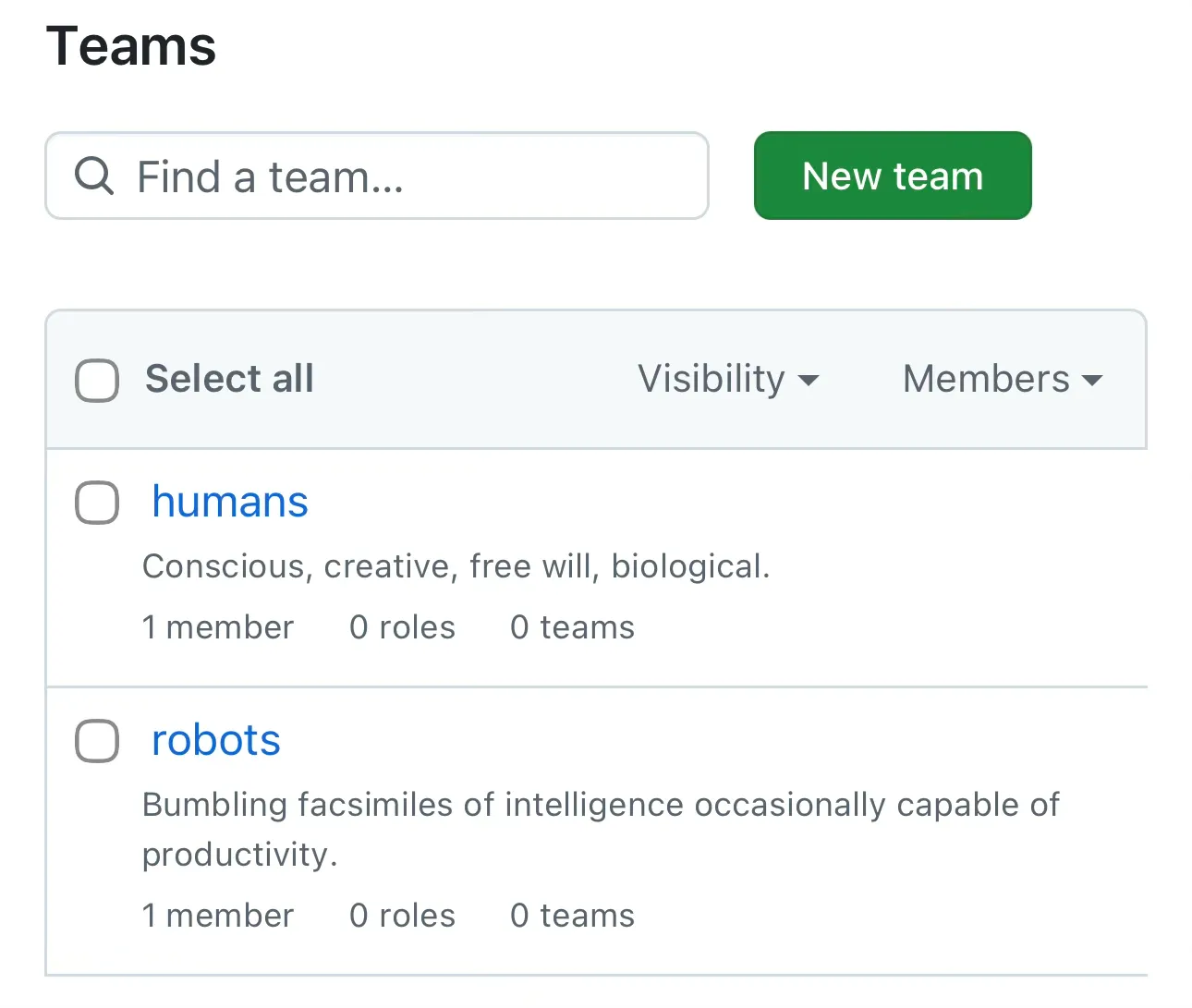
The GitHub App used by ChatGPT is also installed only for the selected repository rather than every repository I own.
The machine account therefore has enough ordinary GitHub authority to read the code, create branches, push implementation changes, open and update pull requests, comment, participate in review, and interact with Actions. It doesn’t inherit my personal GitHub authority just because I’m talking to it through ChatGPT.
3. Let ChatGPT act freely inside that GitHub permission set
Inside ChatGPT I use Allow all actions for the GitHub connection. I don’t want a confirmation prompt for every harmless branch push or pull-request update.
The important restriction is outside ChatGPT. GitHub decides what the machine identity can actually do. The combination is:
- isolated machine account;
- repository-specific App installation;
robotsteam with Write rather than Admin;- protected
main; - protected authoritative paths;
- environment-scoped deployment credentials; and
- a human-only approval and merge path.
The ChatGPT setting removes repeated confirmation prompts. It doesn’t grant GitHub permissions the machine account doesn’t have.
4. Protect main
I use GitHub Team because the repository is private and I wanted the organization/ruleset features rather than relying on convention.
The main protection is configured around the workflow I actually want:
- changes reach
mainthrough a pull request; - one approval is required;
- Code Owner review is required;
- stale approvals are dismissed when the candidate changes;
- the latest reviewable push must be approved;
- review conversations must be resolved;
- required checks must pass;
- linear history is required;
- squash merging is the normal merge method;
- force pushes and branch deletion are blocked; and
- the robot accounts, Copilot, ChatGPT, GitHub Actions, and installed apps don’t get a bypass around those controls.
I learned the value of this early. During the first mobile Copilot setup, an agent committed directly to main when I wanted a branch and pull request. I kept the history and fixed the governance forward rather than treating the mistake as harmless. The repository rules are now the enforcement layer instead of a sentence in a prompt asking an agent to behave.
5. Protect the files that define the rules
Some repository files can change what the automation is allowed to do, so I don’t let the implementation identity quietly rewrite them as part of an ordinary change.
The current CODEOWNERS file assigns the repository to the humans team and explicitly calls out:
.github/CODEOWNERS
.github/workflows/
.github/copilot-instructions.md
AGENTS.md
specs/
governance/
Those paths are paired with the repository’s authoritative-path protection. If one of them legitimately needs to change, ChatGPT gives me the complete proposed replacement file. I switch to my personal account in GitHub on the iPhone, replace the whole file, and make a small standalone human commit in the same pull request.
Replacing the whole file is much less error-prone on a phone than trying to perform line-by-line surgery in a mobile editor. The separate commit also makes it obvious in history that the policy change came from the human identity.
6. Keep production credentials out of pull-request code
Cloudflare credentials aren’t normal repository secrets available to arbitrary pull-request jobs.
Production uses a GitHub environment named production. The deployment workflow explicitly enters that environment only on the trusted production path after merge. The Cloudflare token is narrowly scoped rather than being an account-wide master credential.
The preview path is separated as well. The pull request can build the static candidate without receiving deployment secrets. A later trusted workflow, using deployment logic checked out from main, downloads and verifies the candidate artifact and then uploads it to the isolated Cloudflare preview environment.
That distinction is subtle but important for the design: the pull request can supply the thing being reviewed without supplying the code that decides how production credentials are used.
7. Make the preview a real review surface
Every pull request gets a deployed Cloudflare preview, not just a screenshot or local build report.
The preview workflow:
- builds the pull-request candidate;
- verifies the generated static artifact;
- uploads it to the dedicated Cloudflare preview Worker environment using a per-PR preview alias;
- performs transport and security checks against the live URL;
- runs Playwright against the deployed preview; and
- writes the current preview homepage link into a stable block at the top of the pull-request description.
That last part sounds small, but it changed the mobile workflow. I don’t hunt through bot comments for the current deployment. The thing I need to review is the first link in the PR.
8. Test the actual device shapes I care about
The repository’s repeatable local commands include:
npm ci
npm run check
npm run build
npm run audit:browser
GitHub Actions runs them in clean hosted environments. Playwright exercises desktop Chromium, an Android-sized Chromium browser, and an iPhone-sized WebKit browser. Failed browser runs retain useful artifacts such as screenshots, traces, video, and an HTML report.
After deployment, browser smoke tests run against the actual preview or production URL rather than assuming a successful upload means the site works.
9. Keep provider changes human-authenticated
I didn’t give the coding agent my Cloudflare dashboard login, registrar login, or GitHub owner credentials.
When an account-level setting needs to change, the agent tells me what setting to change and what result it expects. I make the change in the provider’s own interface, then the agent independently checks whatever public behavior can be verified from outside the account.
That gives the automation a way to help with provider configuration without turning my authenticated browser session into part of its trust boundary.
What this changed for me
This setup turned the phone into a practical control surface for work that would normally imply a laptop, terminal, editor, browser automation, and a collection of provider dashboards.
There are still things I deliberately do myself: account ownership, recovery, sensitive provider changes, protected policy files, final approval, and merge. Those aren’t leftovers waiting to be automated. They’re the places where I want the human identity to remain visibly responsible.
Everything else can happen remotely and asynchronously enough that I can keep the project moving without arranging my day around sitting at a computer.
That’s the part I expect to keep.